


 60% OFF

QR codes have become an essential part of digital marketing and business promotion, whether sharing links, files, or supplementary information. Canva, one of the most popular online design tools, also offers a QR code generator.
This article provides a detailed introduction to the Canva QR code generator, including its features, usage instructions, and best alternatives.
Part 1. Canva QR code generator review
What is Canva QR code generator? It's a feature of the design website Canva that allows users to quickly create QR code in Canva directly for free.
However, the Canva QR code generator only generates static QR code, so the answer to the question of "Does Canva QR Code expire?" is: they don't expire, Canva QR code are permanent.
While it's simple to use, not all QR code types can be created in Canva QR code generator.
Pros of Canva QR code generator
- Generate static QR code for free
- Quickly integrate into Canva design
- Easy to use
Cons of Canva QR code generator
- No Canva Dynamic QR code generation
- Unable to track QR code scans in Canva
- Canva QR code occasionally displays an error
- Unable to customize Canva QR code
Part 2. How to create QR code in Canva
Creating a QR code in free Canva QR code generator is simple. Follow the step-by-step instructions below to generate your QR code. However, first, you'll need a Canva account, if you don't have one, create it now.
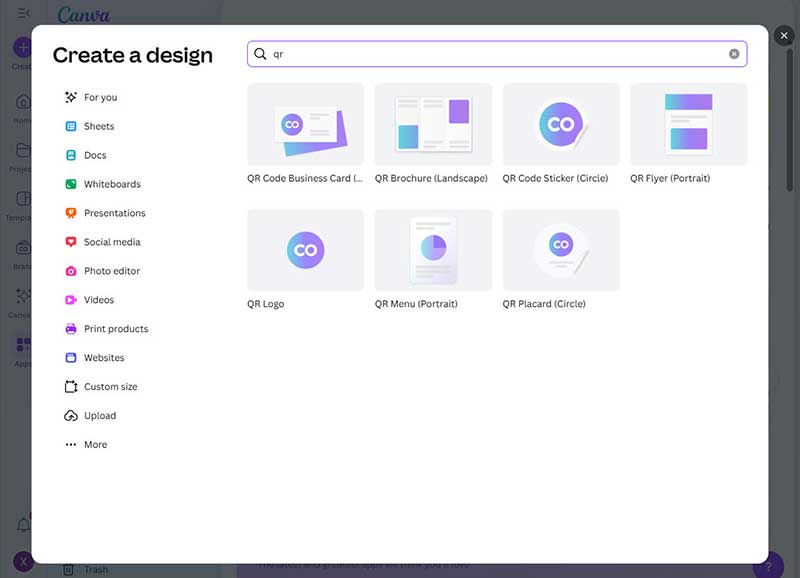
Step 1. Access the Canva QR code generator and log in to your Canva account.
Step 2. Select Create, then search for QR code in the new window that appears.
Step 3. Open the Canva QR code generator and paste the link to QR code.
Step 4. Click the Generate code button to successfully create QR code in Canva.
One of the great things about Canva is that you can integrate the generated QR code into various designs, such as QR Code on flyers, posters, and digital business cards. However, you can only modify the size and position of the QR code, not its the shape or color.
Part 3. The best alternative to Canva QR code generator
While the Canva QR code generator can meet simple static QR code generation needs, you can't select the generated QR code type or modify the QR code design. Furthermore, it lacks professional dynamic QR code generation and scan data tracking.
Have you ever encountered a situation where your Canva QR code can't be scanned successfully? This is because Canva QR code often displays errors. If the Canva QR code generator not working properly or can't meet your needs, don't worry. You can use the best Canva QR code generator alternative: MAKEAQRCODE Generator.
- · Support for multiple QR code types
- · Highly customizable QR codes with easy preview switching
- · Quickly generate high-quality QR codes
- · Extensive templates for diverse application scenarios
Step 1. Enter MAKEAQRCODE Generator and select the QR code type you want to generate.
Step 2. Enter the QR code information and click Next.
Step 3. Customize the QR code style and click Create to generate the QR code in seconds.
Features of MAKEAQRCODE Generator
- Unlimited static & dynamic QR code generation
- 26+ QR code types
- Simple QR code generation steps
- Highly customizable QR code styles
- QR code scan data tracking
- Numerous templates to choose from
If you want to generate QR codes in bulk, you can simply click the Bulk Creation button and upload a CSV file that meets the requirements to easily generate multiple QR codes with one click.
Part 4. FAQs about Canva QR code generator
Question 1. Does Canva have a QR code generator?
Of course, Canva offers a free online QR code generator that allows you to quickly convert link to QR code, but static QR codes only.
Question 2. Can you track QR code scans in Canva?
No. You can create QR Code in Canva, but only static QR code, so tracking QR code scans is not possible in Canva.
Question 3. Are Canva QR codes permanent?
Yes. Because Canva only generates static QR codes, all QR codes generated in Canva are permanently valid.
Question 4. What to do if Canva QR code generator not working?
Even if the Canva QR code generator not working, there are excellent alternatives to Canva QR code generator, such as MAKEAQRCODE Generator, Google Chrome...
Question 5. Does Canva make QR codes?
Of course, Canva offers a free QR code generator that allows users to quickly generate static URL QR code.
Part 5. Conclusion
For anyone who wants to quickly create QR code and add this QR Code on business cards, flyers, and posters, the Canva QR code generator is the best choice. However, Canva QR code generator only generates static QR codes. If you want to track QR code scans, you can use the MAKEAQRCODE Generator. It not only supports 26 types of QR codes, but also allows you to customize the QR code style, choose templates, and more.
Register Now to get up to 60% OFF
Quickly generate QR code with multiple types, styles, and templates





 Dynamic QR codes — edit the link anytime