


 60% OFF

QR codes are now a part of our daily lives. Remember the black and white squares you saw at a restaurant, on a flyer, or on product packaging? That's a QR code. In this article, we'll introduce the popular Adobe QR Code generator, answering all possible questions about Adobe QR Generator.
Part 1. What is Adobe QR Code generator?
Want to know what the Adobe QR Code generator is, you first need to know Adobe. Adobe is a global provider of software services, including professional image design and development tools like Photoshop, Illustrator, and Acrobat.
The Adobe Free QR Code generator online is a built-in tool within Adobe Express. It uses data encoding and compression to help you quickly generate QR codes. You can create QR Code with Adobe QR Code generator online in seconds, generate QR Code from link.
Part 2. How to create QR Code with Adobe QR Code generator?
How to generate QR Code in Adobe Express? As an online free QR code generator, Adobe QR Code Generator helps you convert link to QR code in seconds.
Step 1. Click the Start Now button on the Adobe QR Code generator page to enter the QR code creation page.
Step 2. Enter the URL to generate a link QR code. Then, customize the QR code style, color to suit your needs.
Step 3. Finally, select the Adobe QR code image format you want to download and click the Download button.
Note: A link QR code is a type of QR code. Scanning it will redirect you to the page it points to.
Part 3. Best alternative to Adobe QR Code maker
While Adobe QR Code Maker allows you to generate link QR codes for free, it won't help you if you want to convert PDF to QR code with Adobe or use it as vCard QR code generator.
So, what if Adobe QR Code Generator doesn't work? Simply use its best alternative, MAKEAQRCODE Generator. As a QR code generator, it supports 10+ QR code types, giving you a high degree of freedom in customizing your QR code design, ultimately generating high-quality QR codes in seconds.
- · Support for multiple QR code types
- · Highly customizable QR codes with easy preview switching
- · Quickly generate high-quality QR codes
- · Extensive templates for diverse application scenarios
How to create a QR code using MAKEAQRCODE Generator?
Step 1. Select the QR Code
Enter MAKEAQRCODE Generator and select the QR code type based on your needs: PDF, Image, Video, Social Media, etc.
Step 2. Customize Content
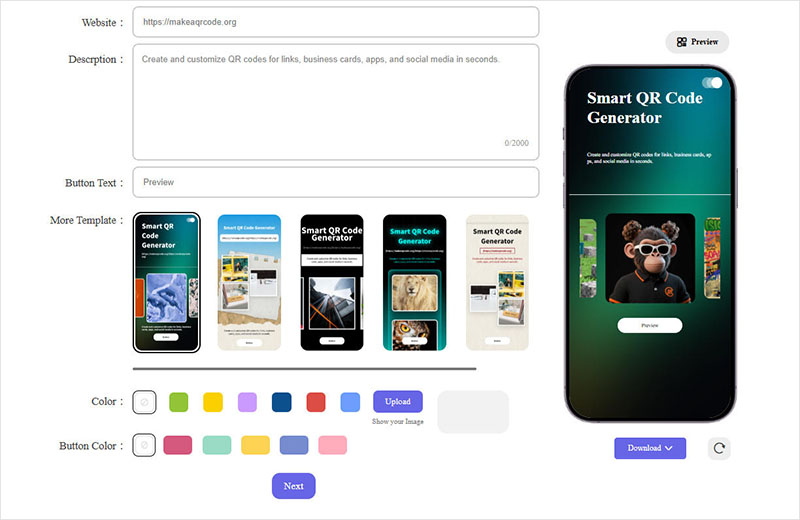
Next, fill in the required information based on the selected QR code type. You can also choose from one of the QR code templates provided by MAKEAQRCODE Generator to create an attractive QR code scan result.
Step 3. Design the QR Code
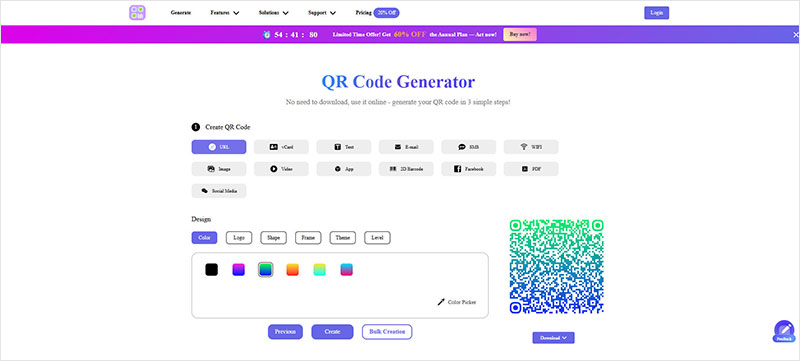
Click Next to proceed. Here, you can modify the QR code style, including the color, shape, and theme, choose whether to generate a QR code with logo, and set the QR code Level to improve QR code scanning success.
Step 4. Create the QR Code
Finally, click Create to successfully generate the QR code.
Unlike Adobe QR Code Generator free online, you cannot convert PDF to QR code with Adobe, as it cannot be used as a PDF QR code generator or a wifi QR code generator.
Part 4. Adobe QR Code creator vs. MAKEAQRCODE Generator
Although both Adobe QR Code creator and MAKEAQRCODE Generator are QR code generators, they have significant differences. The following table will visually show you the differences between the 2 and help you quickly make the right choice.
| Adobe QR Code Generator | MAKEAQRCODE Generator | |
|---|---|---|
| Easy to use | Simple | Simple |
| QR Code Design | Simple shape & color modification | 1. Simple shape & color modification 2. Upload logo 3. Set Level |
| QR Code Type | Link QR Code only | 13 types of QR Codes (link, text, video, image, PDF, digital business card QR code, etc.) |
| QR Code Scan Result | Page from URL | Choose and modify templates to create an attractive and unique results page |
| Scan Data Analysis | No Adobedynamic QR code generator | Scan count, region, device type, time, etc. |
| Pricing | Free | Free trial for 7 days, then $8.99 per month |
Part 5. FAQs
Question 1. Do Adobe QR Code expire?
No, Adobe QR code doesn't expire. However, if the link you used to generate the QR code is invalid, the QR code will display a "Page does not exist" error when you scan this QR Code.
Question 2. How to generate a QR Code in Adobe illustrator?
QR code generation is a built-in feature of Adobe Express. If you would like to create QR code with Adobe, you can use the free online Adobe QR Code Generator.
Question 3. How to generate QR Code with logo in Adobe?
First, generate a link QR code on Adobe Free QR Code Generator. Then, select "Open in Adobe Express" to access the Adobe QR Code Generator with Logo, where you can design a QR code poster and add your logo.
Question 4. Is Adobe QR Code Generator free?
The Adobe QR Code Generator provided by Adobe Express is free and allows you to generate QR codes online.
Question 5. Does Adobe have a QR Code Generator Online?
Yes, no download is required. However, Adobe's free online QR Code Generator only supports creating link QR codes.
Part 6. Conclusion
This detailed Adobe QR Code Generator review explains what Adobe QR Code Generator is, how to create QR code in Adobe, and introduces a top alternative: MAKEAQRCODE Generator, for generating PDF QR codes..., which Adobe QR Code maker can't meet.
Register Now to get up to 60% OFF
Quickly generate QR code with multiple types, styles, and templates





 Dynamic QR codes — edit the link anytime