


 60% OFF

QR code is ubiquitous these days, appearing on menus, payment, and even product packaging. However, QR code can do more than simply display information, it can also be used for tracking data in marketing campaigns.
This article will introduce the basics of QR code, explaining what is a QR code, why use it, and how to generate or scan QR code.
Part 1. Definition - What is a QR Code?
QR code, short for Quick Response Code, is typically an array of black and white squares used to store various multimedia data and content. When a user scans a QR code with QR code scanner, they can access and view the stored data by following the path indicated in the QR code.
With the increasing popularity of mobile phones, using QR code to open web pages, check in at designated locations, obtain coupons, and add contacts has become increasingly convenient.
Part 2. Benefits - Why use QR Code?
As mentioned above, QR code can store multimedia content. A single scan allows users to access the information you've already entered. This makes QR code an excellent tool for promoting events and expanding brand awareness.
QR codes are also portable and support data tracking, allowing for timely monitoring of user engagement and product traceability.

More specifically:
- QR code provides instant access to information.
- QR code can be posted anywhere conducive to marketing, enhancing event promotion.
- QR code is portable and can be scanned directly on most devices, saving time and effort.
- QR code can store a wide range of information, including videos, text, links, images, and more.
- QR code generator can quickly generate highly customizable QR codes, allowing you to add branding and other features as needed.
- QR code provides a new path for data tracking, allowing you to clearly understand user engagement.
Part 3. QR Code Generator - How to make a QR Code?
Given their ubiquity and numerous advantages, how to make a QR code?
The best way is to use a QR code generator to quickly create a QR code that best suits your needs. MAKEAQRCODE QR Code Generator is your best choice. It's easy to use and available online, allowing you to generate QR codes anytime, anywhere.
It also supports 13 different QR code types and provides a vast library of templates, allowing you to quickly create your desired QR code.
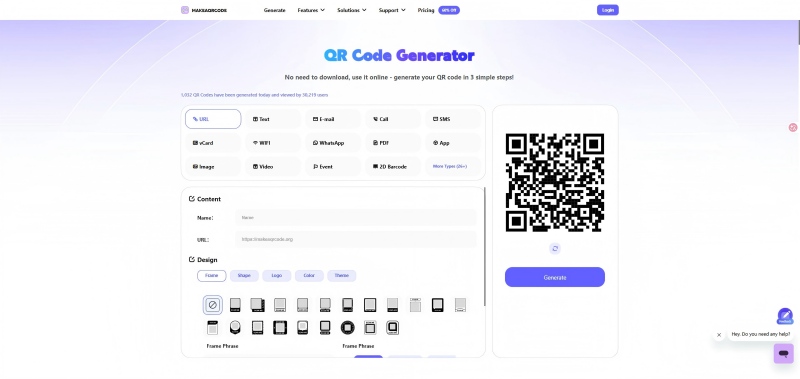
We'll use a URL as an example, below are detailed steps on how to create QR code from URL with MAKEAQRCODE QR Code Generator.
Step 1. Select QR Code Type
First, on the MAKEAQRCODE QR Code Generator page, select URL in the Create QR Code by field. This means your QR code will be generated from a URL.
Step 2. Customize QR Code
Enter the URL and design your own QR code.
You can modify the QR code's color, shape, frame, theme, and level...
Note: level refers to the ability of a QR code to be correctly identified and read by a scanning device even when the code is partially damaged (e.g., obscured, dirty, or worn).
Step 3. Save your QR code
Click Create to generate a QR code. Finally, click Download to save your QR code.
Part 4. QR Code Scanner - How to scan a QR Code?
Scanning a QR code is easy. You can download a dedicated QR code scanner or use your device's built-in QR code scanner.
First, open your mobile and access the Camera app. Then, point the camera at the QR code, keeping it clearly visible, not too close or too far away. Then, tap the recognized result to view the information contained in the QR code.
Part 5. FAQs about QR Code
Question 1. What's the difference between QR code and Barcode?
In fact, QR code is an upgrade of Barcode. The biggest difference between them is that Barcode stores information horizontally, while QR code stores information in both horizontal and vertical directions.
Question 2. What's the difference between static QR code and dynamic QR code?
Once created, static QR code can't be modified, while dynamic QR code allows you to modify the information it contains and choose whether to activate it at any time.
Question 3. Is QR code safe?
QR codes from legitimate sources are secure. If you want to protect your privacy and data, it's best to only scan codes from trusted sources.
Question 4. How does QR code work?
The working principle of QR code is to encode data in a two-dimensional matrix. When you use a device to scan the QR code, the code will be interpreted as data and provide you with the multimedia file contained in the QR code.
Question 5. What does QR stand for in QR code?
QR stands for Quick Response, as the goal of QR code is to quickly decode data encodings.
Part 6. Conclusion
In this article, you've learned about what is a QR code, how it works, why it’s been used widely... If you're looking to create your own QR code right away, use the MAKEAQRCODE QR Code Generator to quickly generate and customize your own.





 Dynamic QR codes — edit the link anytime