



 60% OFF

QR code is an essential part of our lives today, and products related to it is proliferating. Whether it's a QR code generator or a QR code scanner, there are many different brands on the market, including QRcode Monkey, QRFY, MAKEAQRCODE...
This detailed and comprehensive QRcode Monkey review will answer all of your questions, covering the features, usage, best alternatives, and frequently asked questions about QRcode Monkey.
Part 1. What is QRcode Monkey?
QRcode Monkey is a free online QR code generator that provides basic static QR code generation and allows you to customize QR code, such as color, shape, and logo.
Key Features
QRcode Monkey QR Code Generator supports the creation of static QR codes, including links, text, email, phone, SMS, business cards, locations, Facebook, YouTube, Twitter, WiFi, events, and Bitcoin. All supported QR codes allow you to customize the color, shape, and whether to add a logo. QRcode Monkey also offers QR code API service.
Pricing
Is QRcode Monkey really free? If you want to generate dynamic QR code, track QR code data, or access more types of QR code, you'll need to purchase QR Code Generator's paid plan. A monthly plan allows you to generate 2 dynamic QR codes and 10,000 scans is for $19.99.
Part 2. How to use QRcode Monkey Generator?
Because QRcode Monkey free QR Code Generator only supports some static QR code generation, its usage is very simple.
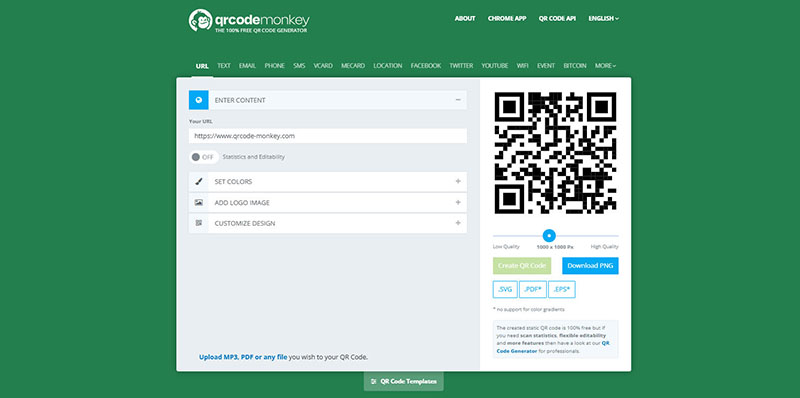
Step 1. After entering QRcode Monkey, select the type of QR code you want to make.
Step 2. Fill in the required basic information. If it's an Event QR Code, it's best to input the name, time, and location of the event.
Step 3. Adjust the QR code's design: color and shape.
Step 4. Click the Create QR Code button. Your QR code will refresh after a few seconds, indicating that it has been successfully created.
Step 5. Click .SVG to download the generated QR code. JPG and PNG require a membership plan.
Part 3. Top alternative to QRcode Monkey
What should you do if QRcode Monkey doesn't meet your needs or is not working? After testing various QR code generators, MAKEAQRCODE QR Code Generator is undoubtedly the best choice.
Why choose MAKEAQRCODE QR Code Generator? The table below shows:
| QRcode Monkey Generator | MAKEAQRCODE QR Code Genrator | |
|---|---|---|
| Static QR Code | Unlimited | Unlimited |
| Dynamic QR Code | 0 for free 2 for paid | 3 for free Unlimited for paid |
| QR Code Scan | 0 for free 10000 for paid | 1000 for free Unlimited for paid |
| QR Code Download | SVG for free PNG, JPG for paid | PNG, JPG for free SVG for paid |
| Bulk QR Code Creation | / | Only for paid |
| QR Code Design | √ | √ |
| Pricing | $19.99/month | $8.99/month |
Generating QR codes with MAKEAQRCODE QR Code Generator is easy. Here, we'll use image QR code as an example and show you how to create an image QR code in 3 simple steps.
Step 1. Select Image QR Code
From the various supported QR code types, select Image as the QR code type you want to generate.
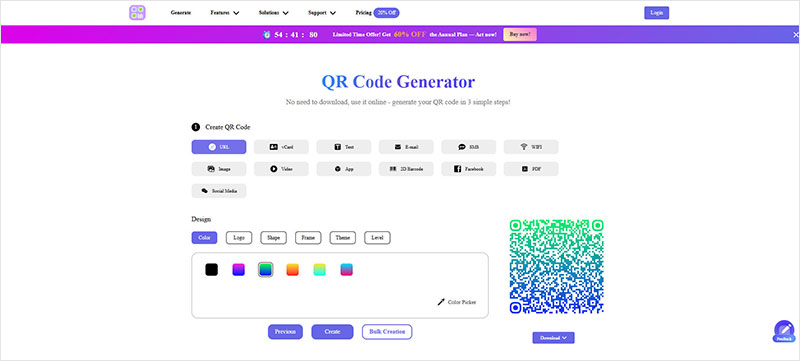
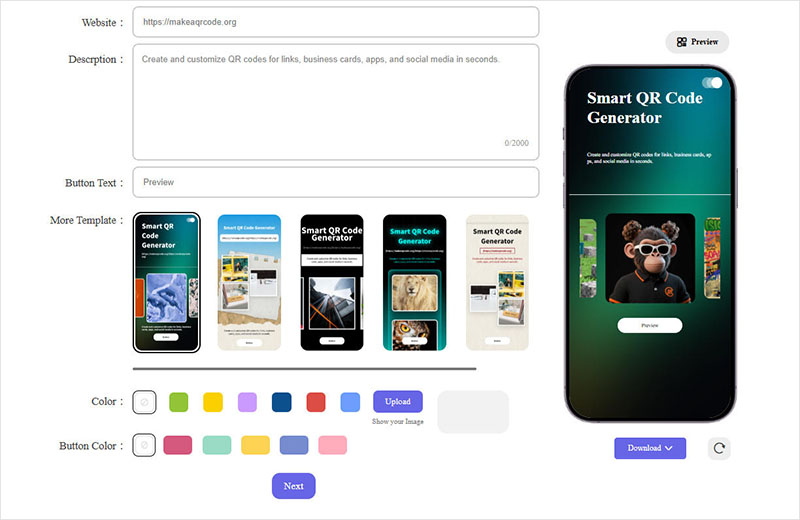
Step 2. DIY QR Code
Fill in the required information according to the image QR code requirements. You can also customize the image placement, the template displayed after scanning, the template's buttons and background color...
Click Next to design your QR code, modifying the color, border, shape, theme, and more.
Step 3. Create Image QR Code
Finally, click Create and wait a few seconds for the image QR code to be successfully generated. You can view, edit, delete, and determine activation status in your profile.
The generated image QR code is the dynamic QR code. Each scan will record data in your profile, where you can view the scan count, device, date, and more.
- · Support for multiple QR code types
- · Highly customizable QR codes with easy preview switching
- · Quickly generate high-quality QR codes
- · Extensive templates for diverse application scenarios

Part 4. FAQs
Question 1. Is QRcode Monkey safe?
Yes. It uses HTTPS for secure data transmission and can be used without registration. However, QR Code Monkey lacks security measures like authentication.
Question 2. What to do if QRcode Monkey not working?
QR Code Monkey only provides simple static QR code creation. What if it doesn't meet your needs or doesn't work? Simply switch to MAKEAQRCODE QR Code Generator, which is capable of generating both static and dynamic QR codes and tracking data.
Question 3. Is QRcode Monkey free?
Yes. QR Code Monkey offers basic features for free. If you want more advanced features, you'll need to upgrade to QR Code Generator Pro and purchase a paid plan, starting at $19.99 per month.
Question 4. QRcode Monkey for vCard, is it available?
Of course. However, QR Code Monkey only supports simple text generation, you can't design elaborate digital business cards or use templates like the ones provided by MAKEAQRCODE QR Code Generator.
Question 5. How to generate a QR code for video?
Go to MAKEAQRCODE, the QR Code Generator for video, select Video QR Code, then upload a video, and customize your QR code. In seconds, your video QR code will be successfully generated.
Part 5. Conclusion
This article provides a detailed introduction to QR Code Monkey. It also provides a detailed comparison between QR Code Monkey and MAKEAQRCODE QR Code Generator.
If you only need to generate a few basic static QR codes, QR Code Monkey is a good choice. If you want to gain access to tracking data for each QR code and access a wider range of QR code types, the more affordable MAKEAQRCODE QR Code Generator is the best choice.
Register Now to get up to 60% OFF
Quickly generate QR code with multiple types, styles, and templates





 Dynamic QR codes — edit the link anytime