


 60% OFF

If you're planning an event, or more simply, want to spread awareness of your brand or product, a common marketing technique is using QR code. QR code can help you quickly disseminate information, and dynamic QR code can also help track data. How to make a QR code? This article will help you find the answer.
Part 1. Different QR Code Types
QR codes are no longer limited to static QR codes used to store and disseminate information. The emergence of dynamic QR codes has greatly facilitated data tracking and analysis.
Depending on how QR codes are stored and modified, they can be categorized as permanent static QR code with unmodifiable content or dynamic QR code that can be modified at any time to track data.
Based on the content they carry, QR codes can be categorized as image QR code, text QR code, video QR code, link QR code, social media contact QR code... This means you can convert text to QR code, even link, PDF, image.
Part 2. How to make a QR Code Online for Free
Creating a QR code is actually quite simple. You can find many powerful QR code makers online that can quickly generate various types of QR codes. After numerous QR code creation and testing, MAKEAQRCODE Generator is one of the best.
- · Support for multiple QR code types
- · Highly customizable QR codes with easy preview switching
- · Quickly generate high-quality QR codes
- · Extensive templates for diverse application scenarios

First, MAKEAQRCODE Generator is an online QR code generator that allows you to create QR codes for free anytime, anywhere. Second, MAKEAQRCODE Generator supports generation of multiple QR code types, meeting all your QR code creation needs. Finally, its simple interface makes it easy to master, even for beginners.
How to make a QR code with MAKEAQRCODE Generator?
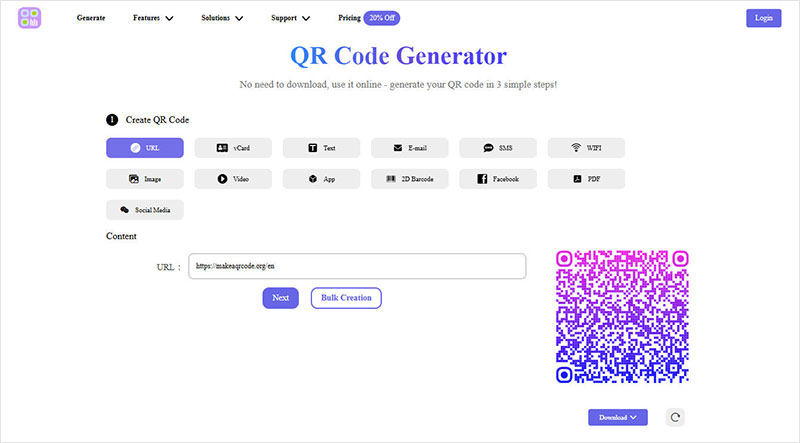
Step 1. Select the QR code type
On the MAKEAQRCODE Generator homepage, select the QR code content type. MAKEAQRCODE Generator supports 13 different QR code types. Here, we'll use how to make a QR code for a link as an example.
Step 2. Customize QR code
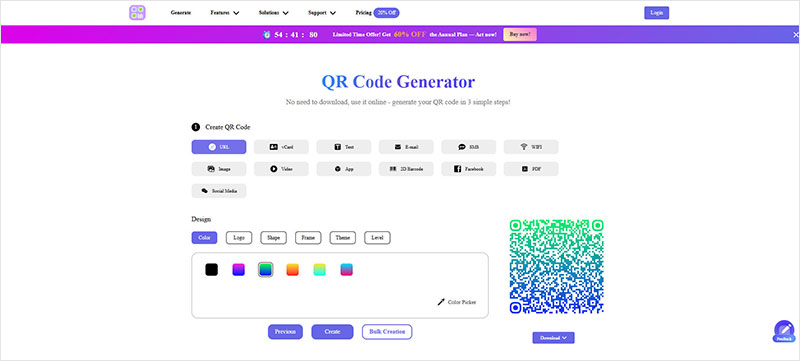
Follow the on-screen instructions and fill in the required information, such as a page link, website address, etc. Then, diy the QR code to suit your event or page style, such as changing the color, shape, theme, border, and more.
Step 3. Make the QR Code
Click the Create button to make your own QR code. Finally, don't forget to click the Download button to save your QR code image.
Part 3. FAQs about QR code creation
Question 1. What is a QR Code?
QR code, short for Quick Response Code, is typically composed of black and white squares and is used to store and transmit information. With the recent development of QR codes, there are now more than just static codes, also dynamic codes that can track data.
Question 2. What is the best QR code generator?
There are many QR code generators available, including online QR code generators and desktop software. After extensive testing and use, if you want to quickly make a QR code for different types online for free, you can use MAKEAQRCODE Generator. It also supports batch QR code generation.
Question 3. How do QR codes work?
QR codes can be quickly scanned and decoded by imaging devices like mobile phones, displaying the extracted information on the interface, such as URLs, text, files, and other data.
Part 4. Conclusion
This article provides detailed 3 steps to show you how to make a QR code with MAKEAQRCODE Generator. It also lists various QR code types and their meanings. If you want to make a QR code online for free, don't hesitate - use MAKEAQRCODE Generator directly.
Register Now to get up to 60% OFF
Quickly generate QR code with multiple types, styles, and templates





 Dynamic QR codes — edit the link anytime